User Reports For LearnDash Free ( Limited Free )

★★★★★ 4.9/5 Rating • Trusted by 500+ Site Owners
v1.0.0 Last Update: October 11, 2026

Are you searching for User Reports For LearnDash Free? Tracking learner progress, completion rates, and quiz performance inside LearnDash LMS is notoriously fragmented when using default tools. Digging through disconnected admin menus and individual user profiles just to see who has finished lessons or fallen behind takes hours of manual work.

User Reports For LearnDash Free is the #1 free LMS reporting and analytics addon designed to give you complete visibility over student outcomes. Powered by a high-speed, modern React Single Page Application (SPA) dashboard, you can track real-time learner progress, monitor course completions, generate cohort reports for Group Leaders, and export data to formatted CSV and print-ready PDF without writing a single line of code.


Why Choose User Reports For LearnDash Free?

Unlike native LearnDash tools that offer basic, disconnected data, this free addon empowers course creators, universities, and corporate training managers with deep, actionable intelligence:

  • Lightning-Fast React SPA Dashboard: Search, filter, inspect, and paginate through hundreds of user records in real time with zero page reloads.
  • Granular Learner Progress Tracking: Monitor exact course progress percentages, completed lesson steps, quiz scores, and activity timestamps for every enrolled learner.
  • Dedicated Group Leader & Instructor Access: Grant Group Leaders dedicated front-facing visibility into their assigned cohorts without exposing sensitive WordPress wp-admin settings.
  • Dynamic Custom Report Builder: Build tailored reporting views filtered by custom date ranges, specific courses, user groups, or pass/fail thresholds.
  • 1-Click PDF & CSV Data Exports: Instantly download polished executive summaries in PDF format or raw CSV spreadsheets for compliance audits and stakeholder reporting.
  • Integrated Bulk Progress Importer: Safely update, synchronize, and migrate student lesson and course completion states across your database in bulk.

How to Track User Reports and Course Progress in LearnDash

Setting up comprehensive reporting for your online academy shouldn’t require complex SQL queries or expensive enterprise software. With User Reports For LearnDash Free, you can be up and running in less than two minutes:

  1. Step 1: Install & Activate: Upload the plugin zip file to your WordPress site and activate it. The plugin automatically initializes high-performance indexing tables.
  2. Step 2: Access Your Central Hub: Navigate to LearnDash LMS > LMS Reports in your admin menu to access real-time charts, course completion trends, and active learner counts.
  3. Step 3: Filter, Inspect & Export: Filter by course, group, or date range to inspect specific learner outcomes, or click Export CSV / PDF to download clean reports for offline analysis.

Supported Reports and Analytics Views

User Reports For LearnDash Free provides specialized reporting modules tailored for administrators, instructors, and managers:

  • Learner Progress Reports: Comprehensive user profiles showing enrolled courses, visual progress bars, completed steps, and last active dates.
  • Course Completion Analytics: High-level overview of total enrollments, active in-progress students, certified graduates, and drop-off points per course.
  • Group Leader Cohort Dashboards: Dedicated cohort breakdowns that automatically restrict data so Group Leaders only view their assigned students.
  • Quiz Performance Breakdown: Visual score distributions, pass/fail ratios, attempt counts, and question grading metrics for every assessment.
  • Frontend Shortcode Embeds: Display dashboards directly on client portals or member pages using WordPress shortcodes like [ld_dashboard] and [ld_user_report].

Comparison: Default LearnDash vs. User Reports For LearnDash Free

Feature Native LearnDash User Reports For LearnDash Free
Analytics Dashboard ⚠️ Basic WordPress Tables ✅ Fast React SPA with Interactive Charts
Group Leader Access ❌ Clunky Admin Screens ✅ Dedicated Frontend Cohort Portal
Export Options ⚠️ Unformatted CSV Only ✅ Formatted CSV & Presentation PDF
Custom Report Builder ❌ No ✅ Date, Course & Cohort Filters
Bulk Progress Importer ❌ No ✅ Safe Batch Progress Ingestion
Price & Licensing Requires Expensive Addons ($150+) 100% Free Lifetime Community License

Technical Specifications & Compatibility

This addon is engineered for stability, speed, and strict WordPress coding standards:

  • WordPress Compatibility: Tested and verified up to WordPress 6.6+
  • LearnDash Version: Requires LearnDash LMS 4.0 or higher
  • PHP Requirement: Fully compatible with PHP 7.4 through PHP 8.2+
  • Architecture: Lightweight React SPA frontend with an asynchronous REST API and dedicated database indexing.

Frequently Asked Questions

Is User Reports For LearnDash Free safe to use on large websites?

Yes. The plugin uses dedicated database indexing and asynchronous REST endpoints. Data is queried on demand rather than loading heavy datasets all at once, ensuring your server remains responsive even with thousands of registered students.

Can LearnDash Group Leaders see users from other groups?

No. The reporting engine strictly respects native LearnDash group assignments. Group Leaders are securely scoped to only view, analyze, and export records for learners enrolled in their assigned groups.

Can I display reports on frontend pages for my team?

Yes. You can use native shortcodes like [ld_dashboard], [ld_user_report], and [ld_course_report] to embed interactive reports directly into your existing theme or private member portals.

Where can I get help or documentation?

Visit our official documentation and tutorial library at WPFalcons Docs for step-by-step setup guides and video walkthroughs.

Plugin Requirements

Current Version

1.0.0

Current Version

Last Update

October 11, 2026

Last Update

WordPress Version

6.6 or Higher

WordPress Version

LearnDash Version

4.7 or Higher

LearnDash Version

PHP Version

7.4 or Higher

PHP Version

1-Click Setup

Zero technical setup required. Plug and play immediately.

100% Compatible

Fully tested with latest WordPress & LearnDash.

Ultra Lightweight

Optimized codebase built for maximum page speed.

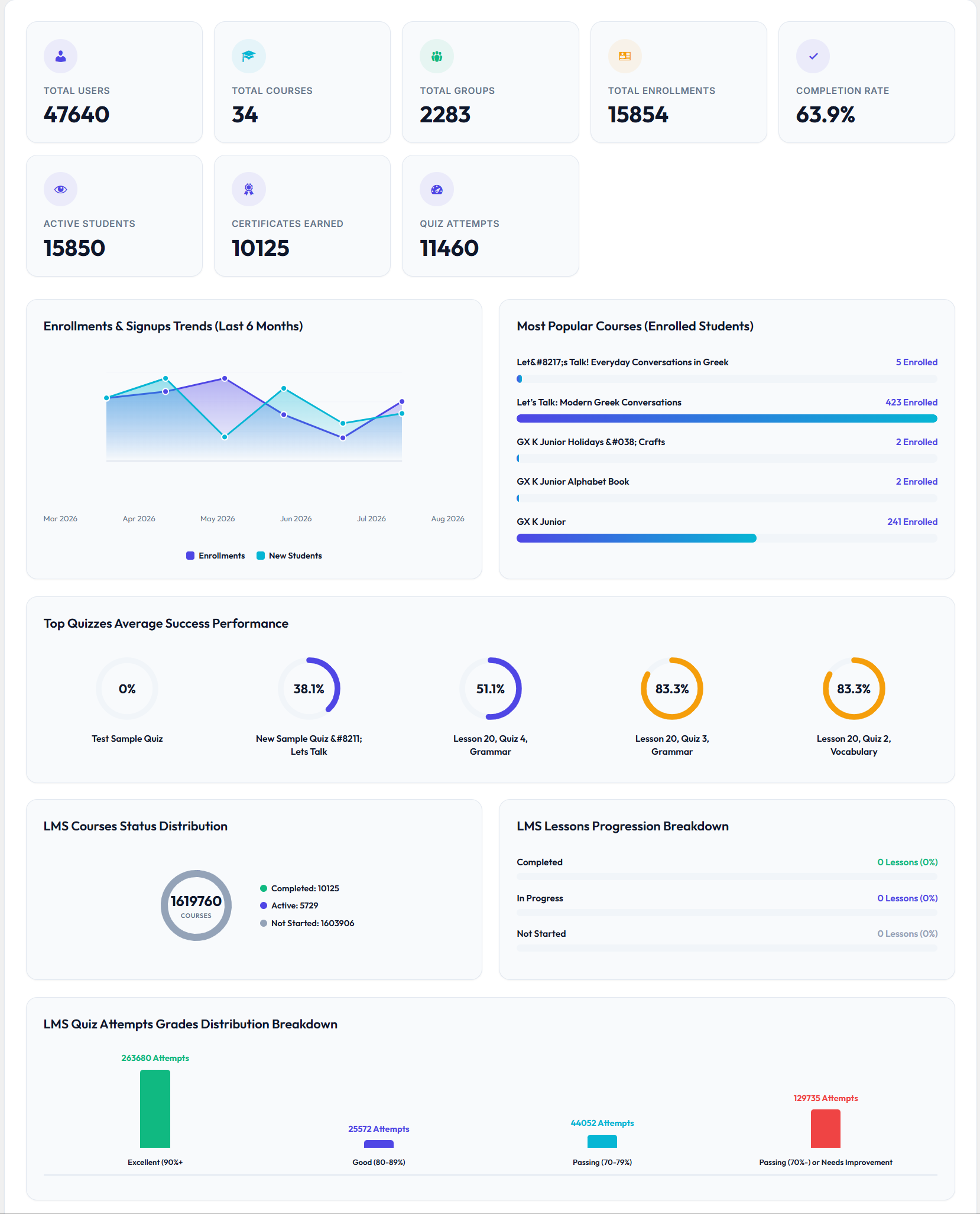
Interactive React Analytics Dashboard

Interactive React Analytics Dashboard

LearnDash Ultimate Reports delivers a modern Single Page Application dashboard powered by React to transform your raw course data into actionable real-time insights. Site administrators and group leaders can visualize course enrollments, student completion rates, active learners, certificates issued, and quiz performance metrics within dynamic responsive charts. Optimized with intelligent transient caching, this dashboard ensures high-speed data rendering without slowing down your WordPress website.
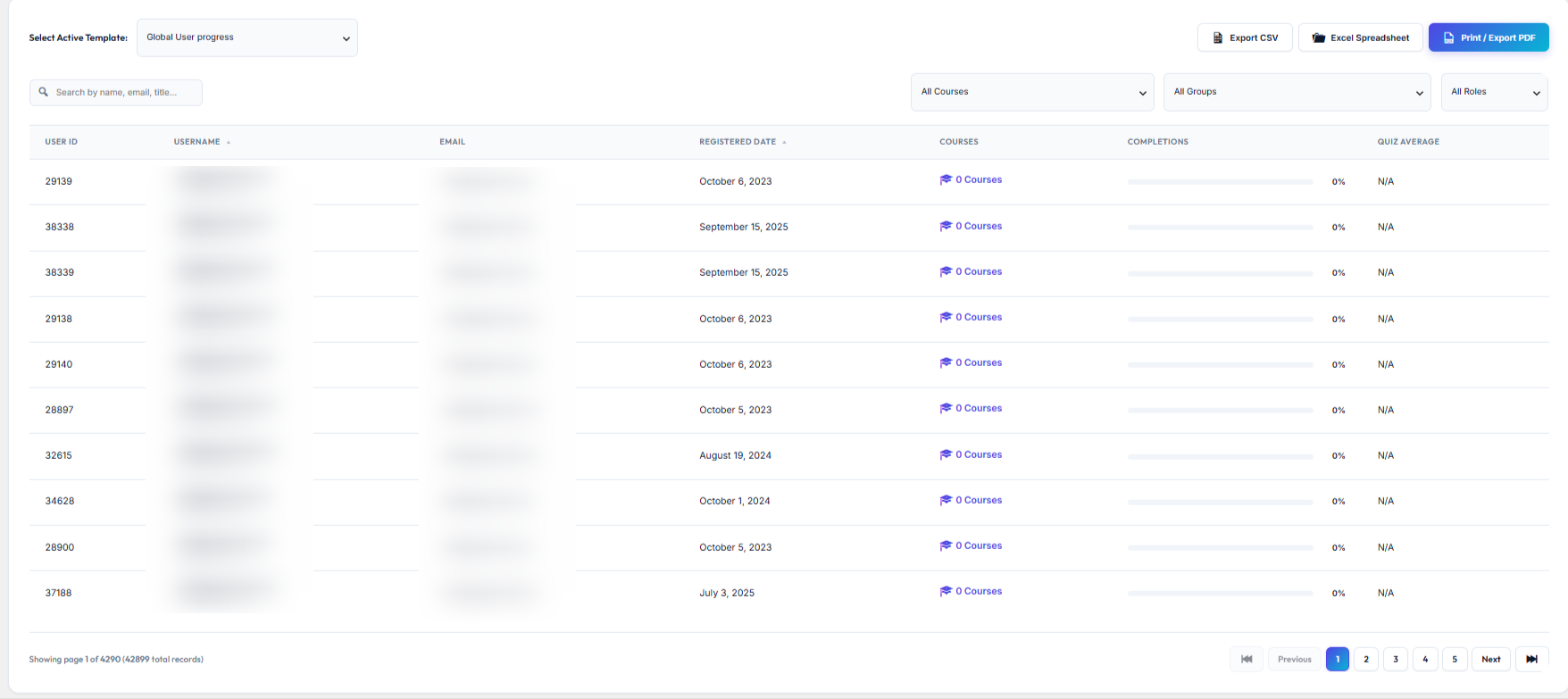
Multi-Dimensional LMS Reports & Instant Drill-Downs

Multi-Dimensional LMS Reports & Instant Drill-Downs

Track learning progress across dedicated User Analytics, Course Progress, and Group Performance reporting modules designed for total LMS visibility. Clicking any user, course, or group instantly opens an interactive drill-down modal window to inspect detailed progress metrics without page reloads. Audit specific lesson completion timestamps, quiz score attempts, and cohort course assignments in a single unified workspace.
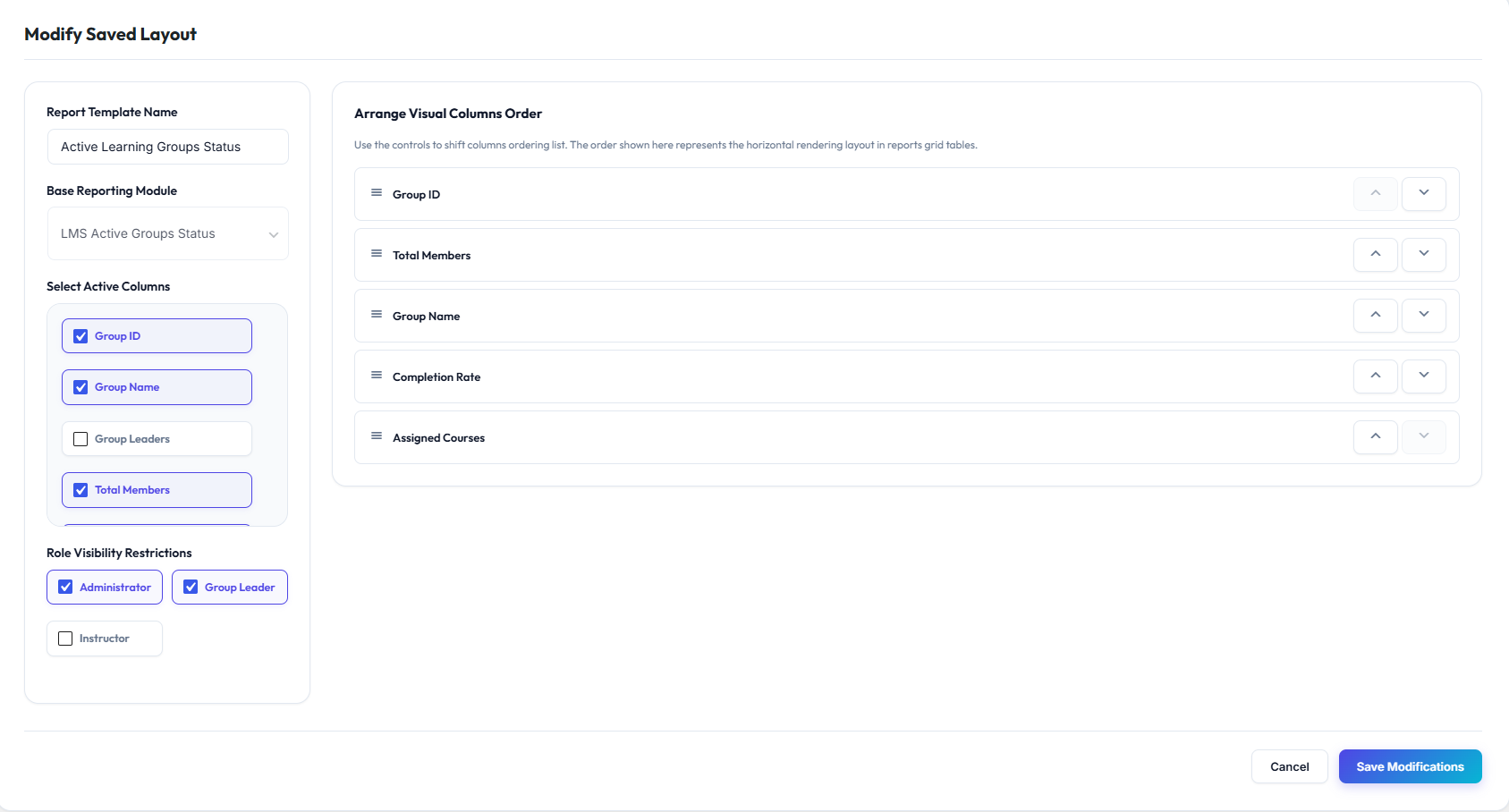
Drag-and-Drop Custom Report Builder

Drag-and-Drop Custom Report Builder

Design customized LearnDash reports tailored specifically to your organization\\\\\\\\\\\\\\\\\\\\\\\\\\\\\\\'s unique key performance indicators and auditing requirements. Easily select specific data columns, apply custom filters, save reusable report templates to the database, and duplicate existing report layouts with one click. Granular role-based visibility options allow you to choose exactly which team members or group leaders can access each custom report template.

More Features
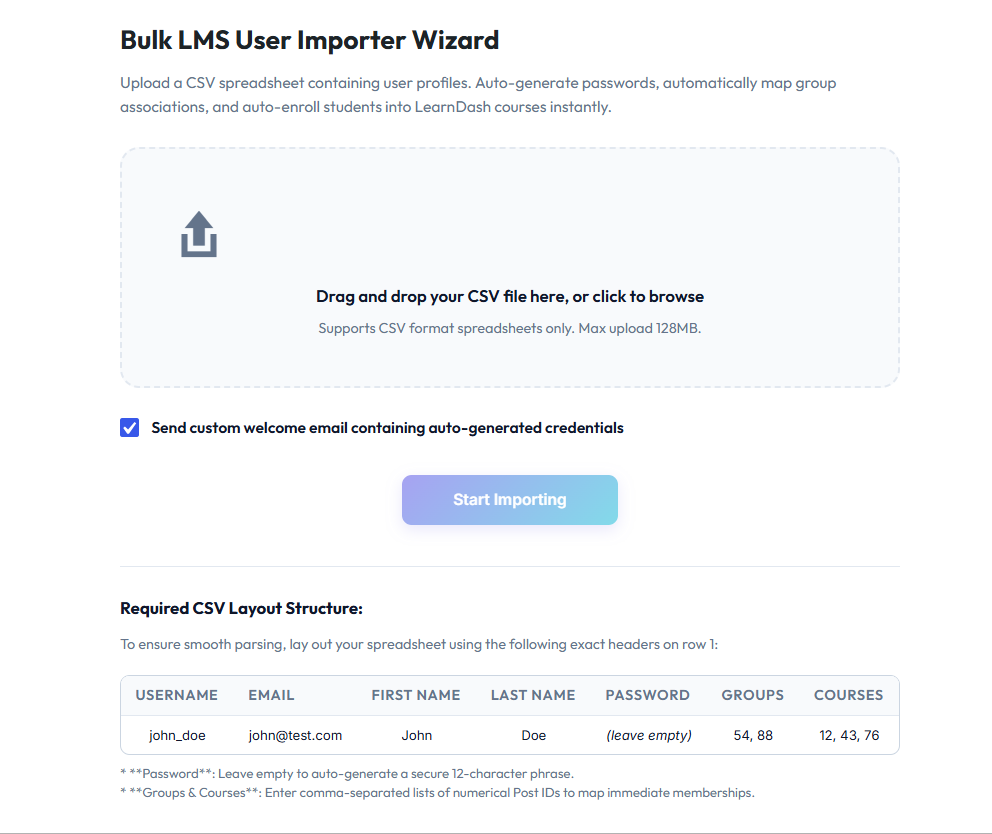
Bulk Student Importer & Automated LearnDash Enrollment

Bulk Student Importer & Automated LearnDash Enrollment

Streamline learner onboarding by importing student rosters directly into WordPress and LearnDash using standard CSV files. The bulk importer automatically creates user accounts, assigns passwords, and grants access to specified courses and learning groups in a single automated batch operation. Enable the optional welcome notification feature to dispatch custom onboarding emails containing direct portal login credentials to new students.
Multi-Format Data Exporter (CSV, Excel & PDF)

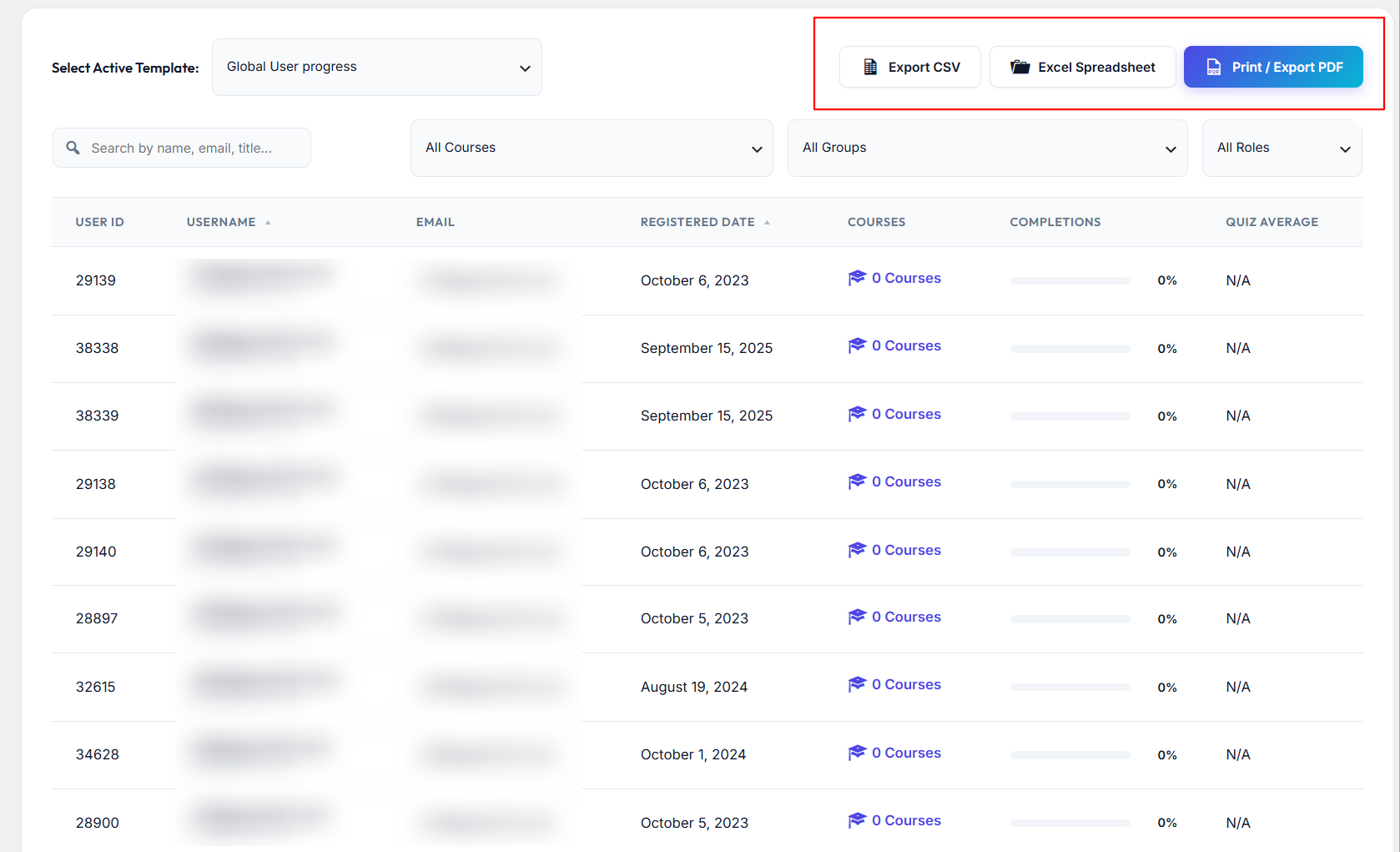
Multi-Format Data Exporter (CSV, Excel & PDF)

Export your filtered LMS reporting datasets effortlessly into standard CSV, Microsoft Excel-compatible spreadsheet files, or print-ready PDF documents for offline auditing. CSV exports feature UTF-8 encoding to preserve multi-language characters and special formatting across external spreadsheet applications. PDF export layouts automatically feature your custom brand logo, current timestamps, site title, and formatted data tables ready for immediate distribution.
Frontend Shortcode Integration

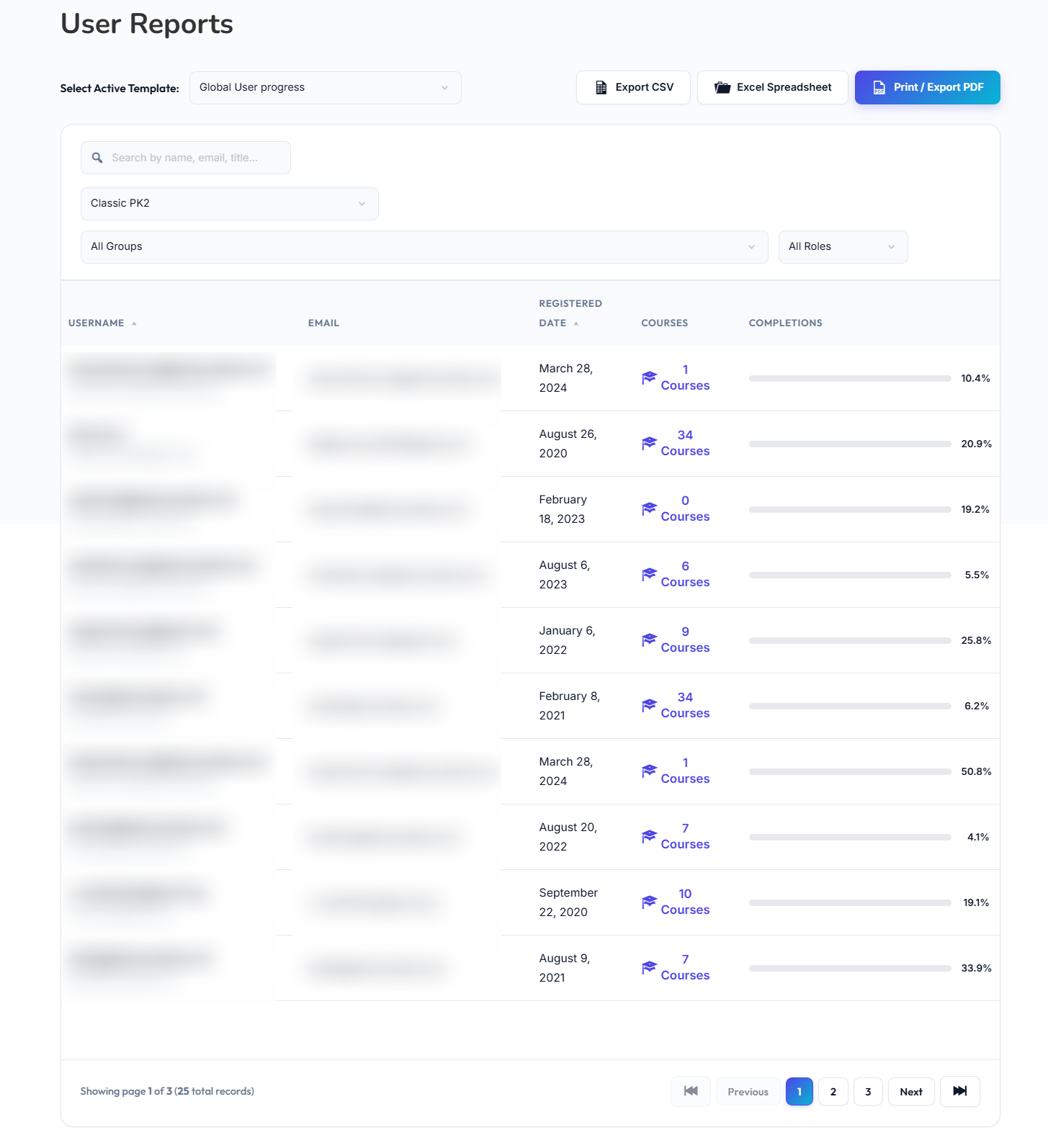
Frontend Shortcode Integration

Embed interactive LMS reporting dashboards and specialized analytics tables directly onto any public or private frontend page using simple shortcodes. Utilize [ld_dashboard], [ld_user_report], [ld_course_report], [ld_group_report], and [ld_custom_report] to share key metrics with non-admin stakeholders. All frontend shortcodes enforce identical security protocols to ensure learners and managers only see authorized LMS data.

Changelog Details

Latest Release

Initial Release
1.0.0

Yes, LearnDash LMS must be installed and active for this plugin to work.

Administrators and Group Leaders can view reports by default, and access can be granted to Instructors or other custom roles in the settings.

No, Group Leaders only see data and reports for students and courses assigned to their specific groups.

Yes, Instructors can view enrollment and progress metrics for the courses they authored.

Yes, you can build, save, edit, and duplicate custom reports with your choice of columns and filters.

Yes, you can upload a CSV file to create user accounts and automatically enroll students into LearnDash courses and groups.

Yes, reports can be exported to CSV, Excel, or printed/saved as a branded PDF.

Yes, you can embed dashboards and reports on frontend pages using simple shortcodes like [ld_dashboard].

No, it includes built-in transient caching to ensure fast loading speeds even with thousands of students.

The PRO version automatically deactivates the free version to prevent conflicts while keeping all your data safe.

Official Product Documentation

Access our comprehensive setup guide and documentation resource for detailed installation, configuration, and troubleshooting steps.

View Documentation

Request a Feature

Have a suggestion or need a custom feature for this plugin? We build our updates based on user ideas. Submit your request and shape the future of this product!

Reviewed by Developers
Fast Responses via Email

Have Questions Before Buying?

Our dedicated support team is ready to answer your questions and assist you.

Scroll to Top